Axis
The Axis class represents an axis. To create an Axis object, use the axis method in the Scene class, for example:
let axis = scene.axis("x", "metric", {y: 300, tickValues: [0, 30, 60]});
Properties
| property | explanation | type | default value |
|---|---|---|---|
channel  | the visual channel of the axis possible values: “x”, “y”, “width”, “height”, or “radialDistance” | String | |
| field | the data field of the axis | String | |
| id | the unique id of the axis | String | |
| isFlipped | returns true if the axis is created for an encoding field and the direction goes from right to left or from top to bottom | Boolean | |
| item | an example item for the axis, useful in cases such as small multiples | Vertex or Mark or Group | |
| labelFormat | the formatter of the axis labels | String | |
| labelOffset | the distance between the labels and the path (Figure 1) | Number | 15 |
| labelRotation | the degrees to rotate the axis labels | Number | 0 |
| orientation | the orientation of the axis if its channel is “x” or “y” possible values: “top”, “bottom”, “left”, or “right” | String | |
| pathVisible | whether to show the axis path | Boolean | true |
| pathX | the x coordinate of the axis path if channel is “y” or “height”, undefined otherwise | Number | |
| pathY | the y coordinate of the axis path if channel is “x” or “width”, undefined otherwise | Number | |
| rotateTitle | rotate the axis title if the channel is “y” or “height” | Boolean | true |
| rotation | the degrees to rotate the entire axis if channel is “radialDistance” | Number | 0 |
| showTitle | show the axis title | Boolean | true if the axis is created for an encoding field |
| strokeColor | the stroke color of the axis path and ticks | Color | “#555” |
| textColor | the text color of the axis labels | Color | “#555” |
| tickAnchor | the anchor of the ticks on the axis if the items are in a grid layout refer to the ridgeline plot for an example usage of this property | String | |
| tickOffset | the distance between the ticks and the path (Figure 1) | Number | 0 |
| tickSize | the size of the axis ticks | Number | 5 |
| tickValues | the values of the ticks on the axis if not provided, Mascot will auto-generate values | Array | |
| tickVisible | whether to show the ticks | Boolean | true |
| title | the text for the axis title | String | |
| titleAnchor | the anchor of the axis title | Array | |
| titleOffset | the distance between the axis title and the path (Figure 1) | Number | 40 |
| titlePosition | the position of the axis title | Array | |
| type | the type of the axis | String | “axis” |
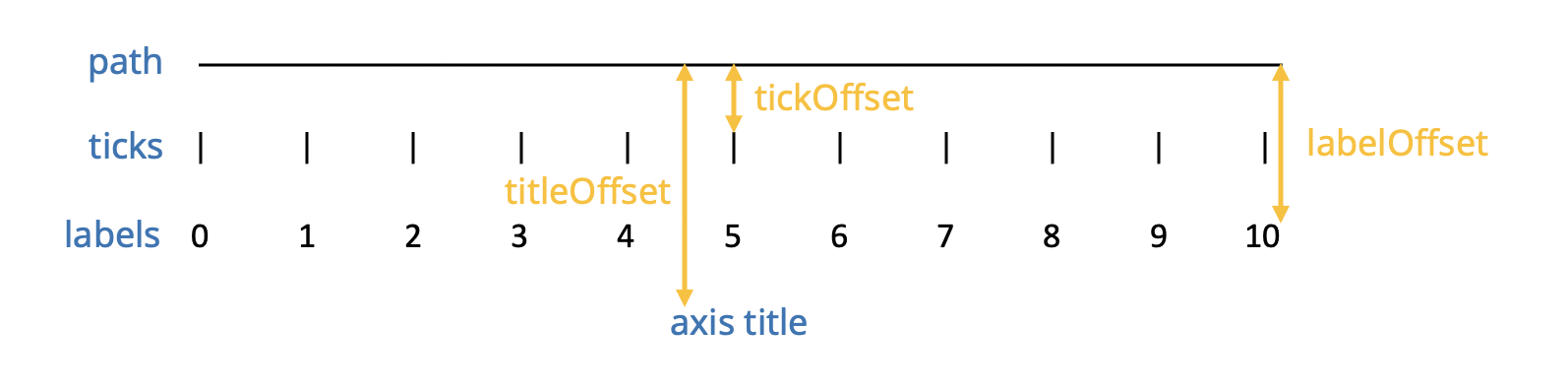
Figure 1: the components in an axis